
NCVPS registration is open for the 2026-2027 school year. The 26-27 NCVPS Catalog is live on our catalog page. Check back periodically for catalog updates. We will also make those announcements here in the E-lert.
We have started districts and charters with their projected allotments from the 25-26 school year. We will adjust those numbers once DPI calculates the projections for the 26-27 school year.
Here are the key dates for the 26-27 calendar, and you can see all dates on our calendar page.
| Key Dates 2026-2027 | ||||||
| Calendar | Start | Last Day to Drop | Last Day to Add | Transfer Enrollments Begin | End | Final Grades Posted |
| Summer 2026 | June 23 | June 29 | June 29 | No Summer Transfers | August 3 | August 11 |
| Early Start Fall Block | August 10 | August 21 | Sept. 8 | Sept. 9 | December 4 | December 10 |
| Early Start Yearlong 26-27 | August 10 | August 21 | Sept. 8 | Sept. 9 | May 4 | May 14 |
| Standard Start Fall Block | August 24 | Sept. 4 | Sept. 18 | Sept. 19 | January 8 | January 14 |
| Standard Start Yearlong 26-27 | August 24 | Sept. 4 | Sept. 18 | Sept. 19 | May 11 | May 20 |
| Early Start Spring 2027 | January 4 | January 15 | February 1 | February 2 | May 4 | May 14 |
| Standard Start Spring 2027 | January 19 | February 1 | February 12 | February 13 | May 11 | May 20 |
New to NCVPS
If you’re new to NCVPS, please visit our Getting Started for Schools page. It will explain our program and give you the necessary details to run a successful online program at your school.
Registration Details
Enroll students through the NCVPS registration system. If you need access, contact our Virtual Support Center.
If you are a new e-learning advisor and NCVPS point-of-contact for your school, please update your contact information in our registration system. Click on the “My Info” tab when you log in to update your information. Please remember that there is only one login per school. If your school already has access, you will need to share the login username and password.
If you are new to the NCVPS registration system or need a refresher, watch our NCVPS Registration Video to help guide you through our enrollment process. You can also print our Quick Registration Guide.
Note: Do you need a yearlong or Early Start section that we don’t currently offer? Submit a request through our Virtual Support Center. We’ll see if we can make that happen.
Registration Tips
Here are a few tips as you register:
- Make sure you’re enrolling in the correct semester. We have summer, fall, spring, yearlong, early standard, and standard start options.
- Be sure to add the IEP modifications as you enroll students with IEPs.
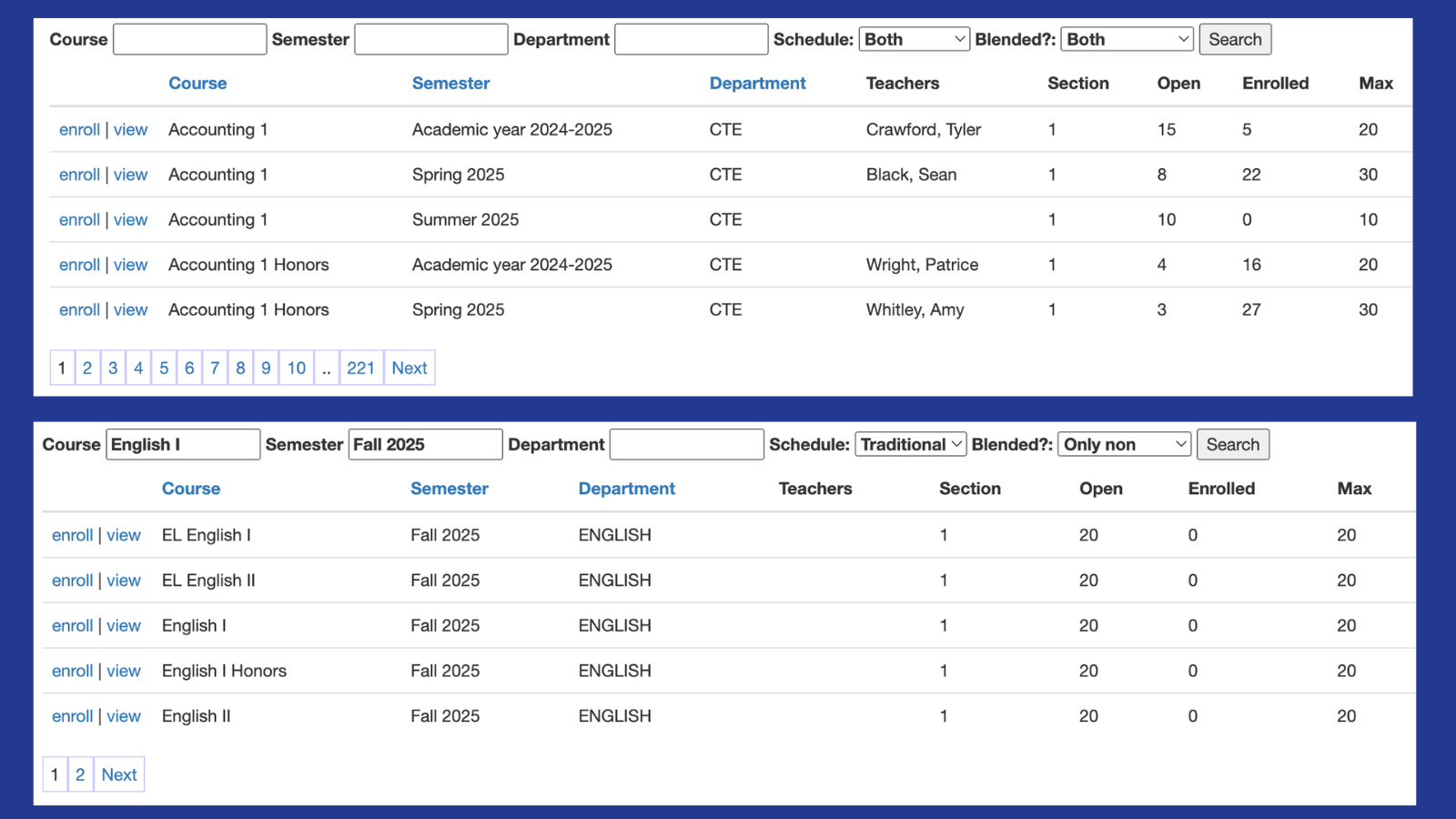
- Use the search feature in our registration system to find the courses you are looking for. We have a filtering feature in our registration system. This feature makes it easier to find the NCVPS courses that you need.
- Download an enrollment report when you’re done registering for the day. Check to see if they’re enrolled or waitlisted.
- Understand our waitlist. Our instructional directors use the waitlist to determine if they need to open a new section of the course or increase the capacity of an already opened section.
- We will likely have a few courses end up on our course capacity list. Popular demand and teacher limitations drive this list. Students waitlisted for those courses may have a difficult time getting a seat in the course.
- Download an enrollment report each day that you register to keep up to date on enrollment status.
- Students will be able to access their courses on the first day of NCVPS classes. Check our calendar for Early and Standard Start Dates. They have easy access through NCEdCloud with their Rapid Identify accounts. If you are at a school where students do not use NCEdCloud, you can access their usernames and passwords in an enrollment report. NCVPS does not send usernames and passwords to students. If your students are logging in directly to Canvas, be sure they are using the NCVPS Canvas link.
Home and Private School Parents
If you are a home school or private school, visit our Home & Private Schools page.
Waitlist and Course Capacity List
NCVPS is not a software program. Our online courses are teacher-led, and we are mindful of their class sizes. If your student is waitlisted for a course, that waitlist is usually temporary. Our instructional directors use the waitlist to determine if they should open a new section or increase the size of a current section. However, each semester, we have a few courses that reach their maximum enrollment capacity. To see courses that have capacity issues, visit our Course Capacity List.
Start, End, and Final Grade Reporting Dates for Fall and Spring Classes
Please note that NCVPS has two final grade reporting dates each semester, one for Early Start courses and one for Standard Start courses.
| Fall 2026 | Spring 2027 |
| Early Start Calendar | Early Start Calendar |
| Classes Begin: August 10, 2026 | Classes Begin: January 4, 2027 |
| Classes End: December 4, 2026 | Classes End: May 4, 2027 |
| Final Grades Reported: Dec. 10, 2026 |
Final Grades Reported: May 14, 2027
|
| Standard Start Calendar | Standard Start Calendar |
| Classes Begin: August 24, 2026 | Classes Begin: January 19, 2027 |
| Classes End: January 8, 2027 | Classes End: May 11, 2027 |
| Final Grades Reported: January 14, 2027 |
Final Grades Reported: May 20, 2027
|
Early Start vs. Standard Start: Choosing the Right Calendar
Each semester, NCVPS offers two scheduling options: Early Start and Standard Start. When deciding which calendar is best for your students, consider these two questions:
1. When will students have access to their courses?
Choose a calendar that aligns with your school’s schedule and ensures students can actively participate in their NCVPS courses from the first day of class.
2. When do you need final grades?
Select the calendar based on when your school requires final grades for reporting, scheduling, graduation, athletics, or other local needs.
Early Final Grade Requests
NCVPS reports final grades only on the two official reporting dates each semester. However, schools may request early final grade reporting for students enrolled in Standard Start courses.
When approved, those students’ final grades will be included in the Early Start final grade report:
Fall 2026: December 10, 2026
Spring 2027: May 14, 2027
These are the only opportunities each semester for early final grade reporting.
Who Can Request Early Grades?
Requests must come from a district or school administrator and should be communicated directly to the NCVPS teacher.
When Should Requests Be Made?
Requests must be made early in the semester.
Student success and academic integrity are our top priorities. Last-minute requests can create pressure for students to rush through coursework, which may compromise learning and mastery of course objectives. Students need sufficient time to complete all required lessons, assignments, and assessments.
We encourage schools to work with data managers, curriculum directors, counselors, and other stakeholders early in the semester to determine whether an early final grade will be needed.
Deadlines for Early Grade Requests
Please submit requests by the following dates:
Fall 2026: September 30, 2026
Spring 2027: February 27, 2027
What NCVPS Will Do
Once an early final grade request is approved:
- NCVPS teachers will adjust pacing guides and assignment due dates to support an earlier course completion timeline.
- Teachers will communicate revised expectations to students.
- Final grades will be reported on the Early Start final grade reporting date.
Please note, NCVPS will not stop the teaching and learning process. If Standard Start students continue to work and submit assignments after the early reported final grade has been shared with the school, our teachers will grade those assignments. An adjusted final grade, including any assignments submitted after the Early Start Final Grade Report is posted, will be reported on the Standard Start Final Grade Report with a comment that the grade has been adjusted due to additional student assignments submitted. Schools have the authority to decide whether to use the early reported grade or the grade from the standard grade report.
Early Final Grade Reporting Dates
- Fall 2026: December 10, 2026
- Spring 2027: May 14, 2027
What Schools Must Do
The enrolling school is responsible for communicating early completion expectations to students and parents.
Because NCVPS cannot alter published course calendars, remove student access before the official course end date, or modify course documentation, schools must clearly communicate that:
- Students are expected to complete the course earlier than the published NCVPS calendar indicates.
- All coursework must be submitted by the adjusted completion date established by the teacher.
- Communicate to students that your school may not record any updated grades after the early final grade is reported. That is a local decision, though. If students continue to submit assignments, NCVPS teachers will continue to grade their work.
To ensure everyone has the same expectations, schools should communicate the early completion timeline to students, parents, and the NCVPS teacher. Clear and consistent communication helps support student success and allows teachers to make the necessary pacing adjustments early in the semester.
Reserve vs. Flexible Funding
Click on the links above to begin the process after you’ve exhausted your allotted money. The requests must come from a district supervisor or charter principal/executive director.
Enrolling in OCS and Intervention Co-teaching Courses
See our new OCS Program page before enrolling in NCVPS courses.
We have a new Intervention Co-Teaching Program page that gives details on the program and enrollment process.
Watch our Enrolling into NCVPS Co-teaching Classes video for a complete guide to enroll in co-teaching classes.
Parental Permission Forms
We have several courses that require parental permission forms: Health and Physical Education, American Sign Language, and Foods and Nutrition.
Access our parental permission forms on our forms page.
Adding IEP and 504 Accommodations
Add a student’s IEP and 504 accommodations in our registration system. This is the new method that you will share those modifications with NCVPS teachers.
Drops and Withdrawals
Be aware of our last day to drop students each semester:
Summer: June 29
Fall Early Start: August 21
Fall Standard Start: September 4
Spring Early Start: January 15
Spring Standard Start: February 1
You can withdraw students throughout the semester. However, after the drop date, the enrollment will count in your allotment totals. See our Drops and Withdrawals Guide for details.
Calendars
View our full 2026-2027 Calendar.
Catalog Updates
Our 2026-2027 Course Catalog is posted online. We have a few courses that are undergoing revisions, and they will not be offered next year.
SAR Data
Schools will access NCVPS SAR data from either an enrollment report or grade report. See our PowerSchool and NCVPS Registration guide for details. Please do not request data directly from teachers. Thank you!
Custody Change
If a student has a change in custody, let us know! Our teachers need to be aware, and we will update the registration to reflect the new custody. Open a ticket with our Virtual Support Center to get started. In the ticket, include the following:
- Student’s name
- Student’s PowerSchool ID#
- School Name
- NCVPS teacher names (if you know them)
- Provide the contact details of the custody change. Please be explicit in who our teachers should and should not contact.
Grade Reporting
NCVPS posts progress grades every two weeks (every week in summer) in our registration system. Final grades are posted in the system at the end of term. See our Snapshot of NCVPS Grading Guidelines for a quick overview of NCVPS’s grading and testing policies and procedures. Please note that NCVPS teachers must adhere to the NCVPS grading guidelines, practices, and procedures which can be found in our Grading and Testing Quick Reference Guide. NCVPS teachers cannot adjust their NCVPS grading guidelines, practices, and procedures based on a local school’s or district’s policy.
Visit our Progress Report Action Steps for action steps you can take with each progress report to support your students.
Class Details
Student Course Access
NCVPS supports two options for course login.
NCEdCloud
NCVPS is integrated with the NCEdCloud IAM Service. Our courses are now available to all secondary students (grades 6-12) in NCEdCloud.
The icon presented to students in NCEdCloud is pictured here:
To avoid confusion with local Canvas instances, the NCVPS logo will be used with the title “NCVPS – Canvas.” Students not enrolled in an NCVPS course will be able to see the icon; however, they will receive an error message if they click the icon.
We know managing fewer passwords makes it much easier for both schools and students.
Direct Canvas Login with Username and Password
NCVPS students still have the option to log in at our NCVPS Canvas link with their usernames and passwords if schools or students prefer that method.
Note that schools must issue NCVPS usernames and passwords to students. NCVPS does not send login details to students. Schools can retrieve usernames and passwords in an enrollment report posted in our registration system.
Students will have access to their courses at 7 a.m. on the first day of classes. Before classes begin, students can go through our NCVPS Demo Course for an orientation. We also have Pre-Instruction Resources for each class. These resources help students get a better understanding of courses before classes begin.
Getting Started
Direct students to our Getting Started as an NCVPS Student page before classes begin. This page will help students get oriented and answer all their questions on how our courses work.
Student Life
NCVPS has numerous ways for students to get involved online and stay engaged. Visit our Student Life page to see all the clubs, online meetings, and support features available to them.
Support Features
Quick Tips on Getting Your Students Started
- Students can log into NCVPS courses through NCEdCloud. If your students do not use NCEdCloud, you will need to send your students their usernames and passwords. NCVPS does not send that to students. You can find student usernames and passwords on an enrollment report.
- We have login troubleshooting steps on the course login page.
- If students are registered on or after the first day of class, it takes about 24 hours to get access.
- Send your students to our Getting Started for Students page and ensure they have our recommended printable guides.
No-Show Reports
Each semester, we post a Day-5 No-Show Report (Day-3 for summer) in our registration system. (See our Guide for Accessing Grade Reports.) This report is an early warning notification that identifies students who have not logged into their courses during the first week of classes. We realize some students are registered the same day we generate the report, and they’ve not had a chance to log in yet. That’s not an issue. Other reasons can be problematic, however. The school should take action if students fail to log in for any of the following reasons:
- Do not know their username/password
- Unsure how to log in
- Unaware they are registered
- Do not intend to take the course
- Registered by mistake
Please make contact with students (and their parents) who have not logged in. Determine the next steps for them. Sometimes, students need help getting started, and then they are good from there. If you confirm that the student is not going to take the course, please drop them from the course in the registration system. This will help other students move off the waitlist.
Weeks 1 and 2 – Access Check and Enrollment Options
Visit our Access Check and Enrollment Options page for essential details to ensure your students have a successful start.
Semester Success with NCVPS
See our Semester Success with NCVPS page for some sure steps to help you and your students in their NCVPS classes.
Printable Guides and Checklists
We have a number of printable guides for ELAs, students, and parents.
Be sure students and parents have the following printable guides:
- Getting Started Checklist for NCVPS Students
- NCVPS Student Start-Up Guide
- NCVPS Student Success Guide
- Student Help Guide
- Supporting Students – A Guide for Parents and Mentors
We have guides for schools, too:
- NCVPS Quick Registration Guide
- NCVPS Quick Registration Guide for OCS and Co-Taught Courses
- Guide for Accessing NCVPS Enrollment Reports
- Guide for Accessing Grade Reports and No-Show Reports
- Drops and Withdrawals Guide
Canvas Parent App
Parents, facilitators, and mentors and track their student’s progress with the Canvas Parent App. See the full details on our Canvas Parent App and Web Portal page.
NCVPS App
Download the NCVPS app to receive notifications on your smartphone. The NCVPS app is a great companion app for parents. The app is used for NCVirtual “front office” communications to parents. Search for “NCVPS” in the Apple and Android stores. See our NCVirtual App page for details.
ELA Orientation Course
Our E-learning Advisor Orientation course will help support you in the role of E-Learning Advisor to NCVPS students. Learn about the funding formula, the registration process, our grading policy, our valuable resources, and how to best support your online students.
Access the E-learning Advisor Orientation today!
Supporting Students Online – Parent Courses
As virtual learning has become a part of everyday learning for most families across North Carolina, many parents, guardians, and mentors continue to struggle with how to support their online learners in blended and online classes. To provide resources and strategies for how to support not only our NCVPS students, but all online learners in North Carolina, NCVPS has created two Supporting Online Students (SOS) video courses in Canvas. Both courses are free, open to the public, and do not require login credentials.
The first course, Supporting Online Students – All NC, is general in nature and is designed for parents, guardians, and mentors of any student who is participating in a blended or online course or is enrolled in a fully online program regardless of school or grade level.
The second course, Supporting Online Students – NCVPS, is specific to NCVPS and includes specific examples, demonstrations, and resources for NCVPS parents, guardians, and mentors.
Please share both links with your educational communities and parent networks.